Stream Setup
Connect Stream and Pickpad can start receiving orders from DSP platforms like DoorDash, Uber Eats, and Grubhub directly, without a separate integration for each one.
1. Select Stream as order source
In the Pickpad Dashboard, go to Settings and set Orders source to Stream.
2. Add Pickpad as a dispatch provider in Stream
In the Stream portal, add Pickpad as a dispatch provider for your stations. Stream's own guide walks you through it:
How to connect a dispatch provider →
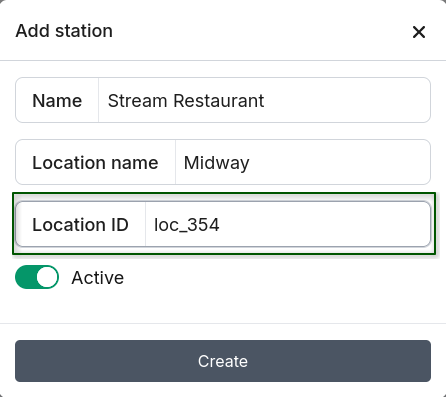
3. Create a station in Pickpad
Go to Stations in the Pickpad Dashboard and create a station. In the Location ID field, enter an identifier for this location. Any value works — downtown, location-1 — or you can just copy the location ID straight from the Stream portal.
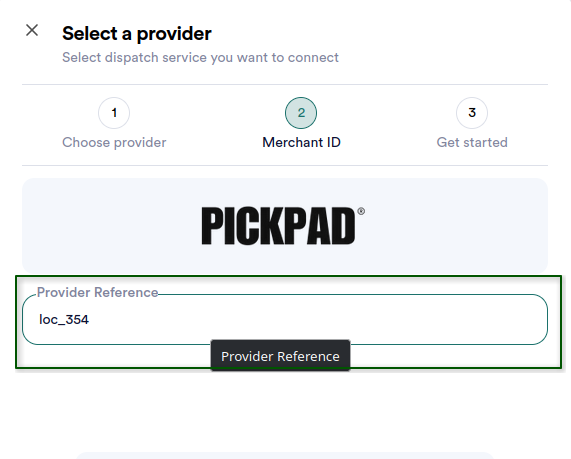
4. Set the Location ID in Stream
Back in the Stream portal, open the dispatch provider settings for the matching station and paste that same Location ID into the Reference field. This is what links the two sides together, so Stream knows which Pickpad station should get each location's orders.
Multiple stations per location
Want several Pickpad stations handling orders from the same Stream location — say, multiple counters in one restaurant? Create multiple stations in Pickpad and give them all the same Location ID. Every station sharing that Location ID will receive orders from that Stream location.