Orders Management
Controls when an incoming order gets assigned to a Pickpad, what it shows while waiting, and how completion is tracked.
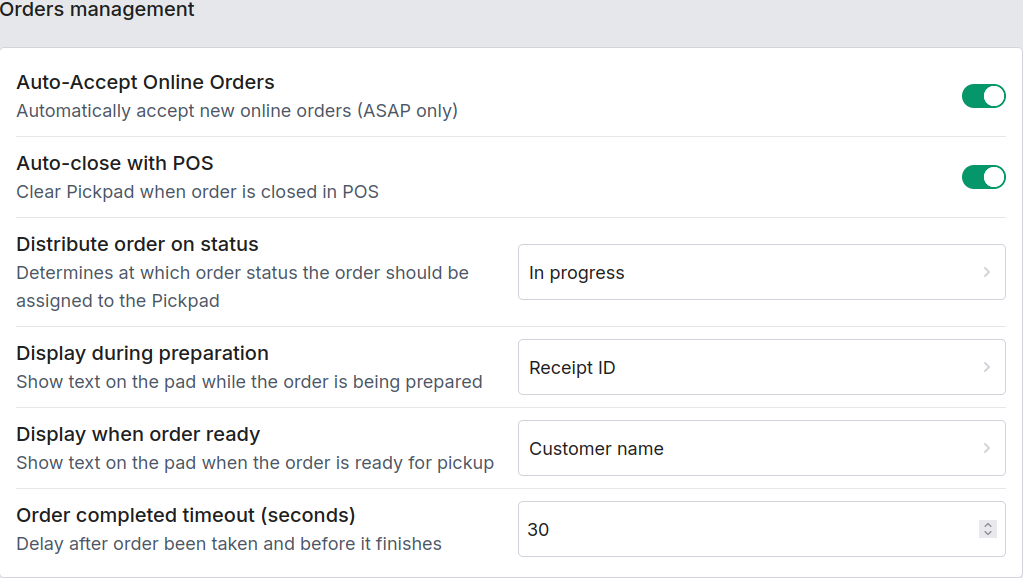
| Field | Description |
|---|---|
| Accept new orders | Automatically accept new online orders (ASAP only) and distribute them without staff having to step in. |
| Close order when closed in POS | Clear the Pickpad when the order is closed in your POS, keeping the two systems in sync. |
| Distribute on status | Determines at which order status the order gets assigned to a Pickpad — as soon as it's Preparing, once it's Prepared, or only when it's Finished. |
| Display when preparing | What the Pickpad shows while the order is still being made — nothing, the receipt ID, or the customer's name. |
| Display when prepared | What the Pickpad shows once the order is ready for pickup — receipt ID or customer name. |
| Order completed timeout (seconds) | How long the Pickpad waits after the customer removes the order (weight drop, ORDER_COMPLETED) before it force-clears and becomes free again. Default: 30 seconds. |
Which order types reach this station
Which order types (pickup/delivery/in-store) actually get routed to this station's Pickpads is a separate block — see Order Types.
If every Pickpad at a station is busy when an order arrives, it doesn't fail — see Order Queue for how Pickpad holds onto it until a Pickpad frees up.